


Naya
This could be the most overengineered piece of desktop gear I’ve ever seen. The Naya Connect system revolves around a modular keyboard and four companion devices that add layers of shortcuts and tactile controls to your setup.
No matter which apps power your workflow, these gadgets aim to keep all your tools close at hand. At its core is a premium mechanical keyboard that checks every enthusiast box, plus three magnetically snapping modules you can arrange however you like to take things further.

A Versatile Hub for Custom Input
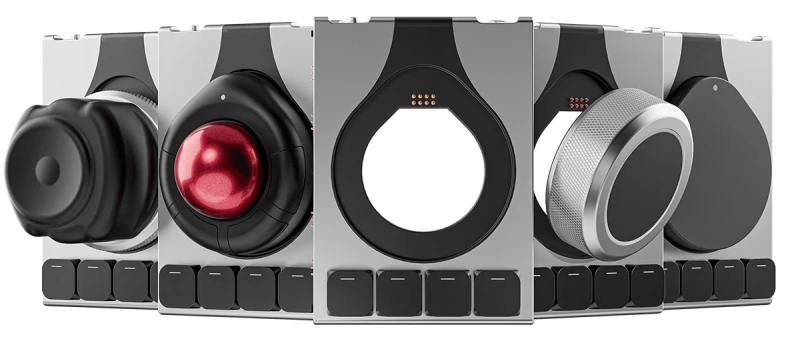
First and foremost is the Dock, featuring four programmable keys and a circular slot for a specialized input device that can effectively replace your mouse in certain applications:
- A customizable trackpad with multi-finger gestures and configurable touch zones, ideal for productivity apps and web browsing.
- A 40 mm trackball with axis locking, scrolling, and four physical buttons, useful for audio and visual design tools.
- A programmable rotary dial offering adjustable resistance, fine or coarse ratcheted clicks, plus a touch-enabled top surface—great for scrubbing through video timelines.
- A 6-DoF spatial mouse for precise 3D modeling in CAD, animation, and game development, complete with an integrated rotary encoder.
Naya
And that’s only the first module. Also included are the 24-key Multipad, usable as a left- or right-handed numpad, and the 6-Key, a column of six programmable buttons.

Naya
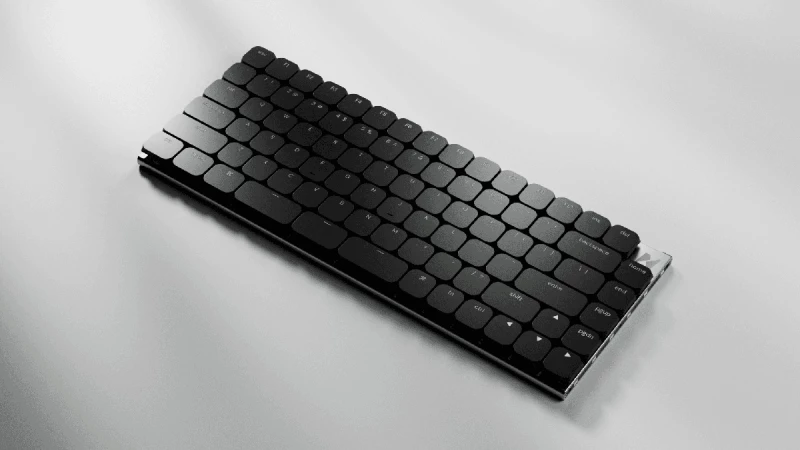
If the 75% keyboard is what caught your eye, it’s a slim 85-key design with a machined aluminum unibody under 15 mm thick. It uses hot-swappable Kailh Choc V2 switches, dished polycarbonate keycaps, and offers five switch options ranging from linear to clicky, with several in between.
Naya
Programmable Keyboard with Modular Expansion
The keyboard features fully programmable keys with per-key RGB lighting and USB-C connectivity, with modules snapping magnetically to either side. It supports 1,000 Hz polling and works across Windows, Linux, macOS, and mobile platforms.
You can start with the keyboard and add modules, or use the Dock for wireless connectivity and expansion. Naya’s desktop software lets you fine-tune virtually every aspect of how the hardware behaves.
Overall, it sounds like a dream setup for anyone who wants maximum flexibility at their desk. The option to customize modules and interact with creative software is highly appealing. Naya highlights the careful engineering of each component, and I’m excited to see it in action.

Naya
Crowdfunding Deals on the Connect Suite
The Connect suite is currently being crowdfunded on Kickstarter, with early backers getting discounted prices. The keyboard, normally $189, is available for $119, while the Dock is $45 instead of $69. Dock-compatible input devices range from $55 for the Touch trackpad to $129 for the Float spatial mouse.
For extra keys, the 6-Key is $35 (down from $49) and the 24-key Multipad is $50 (down from $69). Shipping is additional, and you can estimate costs by selecting your location when pledging.
As with any crowdfunding project, there’s some risk involved. Naya, from Groningen, Netherlands, previously launched a high-end split keyboard on Kickstarter, and the four Dock devices also work with it. The Connect has already surpassed its funding goal with over 1,100 backers.
Expect a long wait: Kickstarter orders ship from February 2027. For enthusiasts who care deeply about their desktop setup, the wait may well be worth it.
Read the original article on: New Atlas
Read more: Microsoft Research unveils The Rho-Alpha Model For Robotics


